Singular Value Decomposition (SVD) is a powerful matrix decomposition technique that has numerous applications in data analysis, machine learning, signal processing, and more. In this chapter, we will explore some of the most important applications of SVD in practical contexts.
4.1 Low-Rank Approximation
One of the key applications of SVD is low-rank approximation, which allows us to approximate a matrix \(A \in \mathbb{R}^{n \times p}\) by another matrix of lower rank \(k\). This is particularly useful for reducing the storage and computational complexity of large datasets.
4.1.1 Best Rank-\(k\) Approximation
Given the SVD of a matrix \(A = U \Sigma V^T\), the rank-\(k\) approximation of \(A\), denoted as \(A_k\), is obtained by truncating the SVD:
\[
A_k = U_k \Sigma_k V_k^T
\]
where:
\(U_k\) consists of the first \(k\) columns of \(U\),
\(\Sigma_k\) is a diagonal matrix containing the largest \(k\) singular values,
\(V_k\) consists of the first \(k\) columns of \(V\).
This approximation minimizes the Frobenius norm:
\[
\| A - A_k \|_F
\]
and is the best approximation of rank \(k\) in terms of capturing the maximum variance of the data.
4.1.2 Example: Image Compression
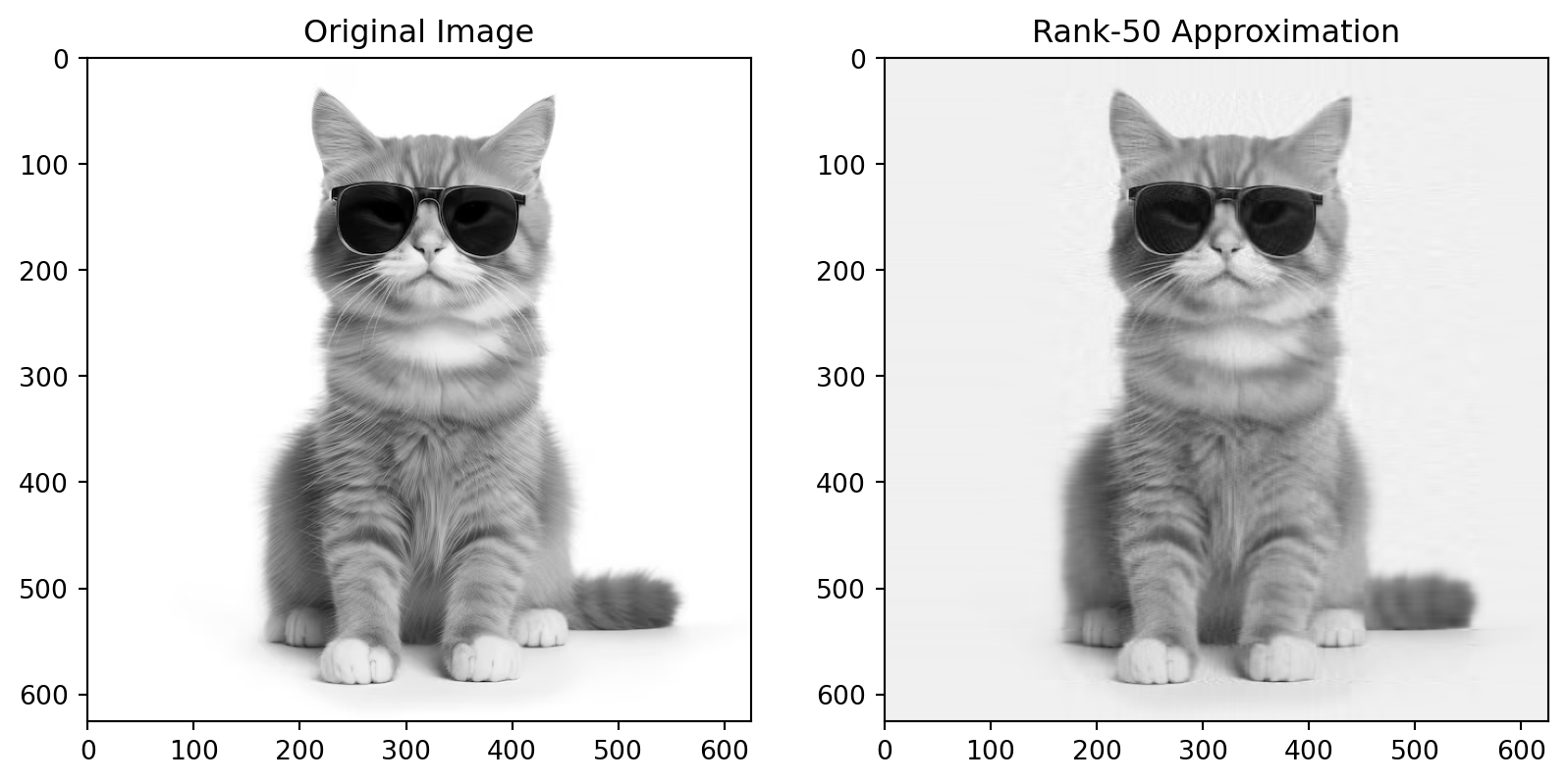
Images can be represented as large matrices where each entry corresponds to the intensity of a pixel. Using SVD, we can create a low-rank approximation of an image that retains most of the visual features while reducing storage size.
import numpy as npimport matplotlib.pyplot as pltfrom scipy.linalg import svd# Load an example imageimage = plt.imread('cat.png')# Convert the image to grayscale (optional)image_gray = np.mean(image, axis=2)# Perform SVDU, Sigma, Vt = svd(image_gray, full_matrices=False)# Create a rank-k approximation (k=50)k =50image_approx = np.dot(U[:, :k], np.dot(np.diag(Sigma[:k]), Vt[:k, :]))# Display original and compressed imagesplt.figure(figsize=(10,5))plt.subplot(1, 2, 1)plt.imshow(image_gray, cmap='gray')plt.title("Original Image")plt.subplot(1, 2, 2)plt.imshow(image_approx, cmap='gray')plt.title(f"Rank-{k} Approximation")plt.show()
In this example:
The original image is represented by a matrix \(A\).
We compute its SVD, retain the largest 50 singular values, and reconstruct the image using the rank-50 approximation.
The result is a compressed version of the original image, with significantly fewer values.
Compression Ratio
The compression ratio is the ratio of the number of stored values in the approximated image \(A_q\) to the number of stored values in the original image \(A\):
Where: - \(q\) is the number of singular values retained, - \(m \times n\) is the size of the original matrix \(A\).
4.2 Principal Component Analysis (PCA)
Principal Component Analysis (PCA) is a widely-used dimensionality reduction technique that can be computed using the SVD. Given a centered data matrix \(X\), the PCA of \(X\) can be derived from the SVD:
\[
X = U \Sigma V^T
\]
The right singular vectors (columns of \(V\)) are the principal components, and the singular values in \(\Sigma\) represent the amount of variance explained by each principal component.
4.2.1 PCA and Dimensionality Reduction
By keeping only the first few principal components, we can reduce the dimensionality of the dataset while preserving most of the variability. This is particularly useful for large datasets with many features, such as gene expression data or image data.
4.2.2 Example: PCA with SVD in Python
import numpy as npfrom sklearn.decomposition import PCA# Generate synthetic datanp.random.seed(0)X = np.random.rand(100, 10)# Perform PCA using SVDU, Sigma, Vt = svd(X - np.mean(X, axis=0), full_matrices=False)principal_components = Vt.T# Display the first two principal componentsprint("First two principal components:", principal_components[:, :2])
In this example, we compute the principal components using the SVD of the data matrix \(X\).
4.3 Latent Semantic Analysis (LSA)
Latent Semantic Analysis (LSA) is a technique used in natural language processing (NLP) to uncover relationships between terms and documents in a text corpus. It is based on the SVD of a term-document matrix \(A\), where rows represent terms and columns represent documents.
After performing the SVD of \(A\):
\[
A = U \Sigma V^T
\]
The matrix \(U\) represents terms, \(V\) represents documents, and \(\Sigma\) captures important latent relationships between terms and documents.
4.3.1 Example: Latent Semantic Analysis
from sklearn.feature_extraction.text import CountVectorizerfrom sklearn.decomposition import TruncatedSVD# Example text datadocuments = ["SVD is useful for dimensionality reduction","PCA is a common application of SVD","SVD can be used for text analysis","LSA uncovers relationships in text"]# Convert the text data into a term-document matrixvectorizer = CountVectorizer()X = vectorizer.fit_transform(documents)# Perform Latent Semantic Analysis (LSA) using SVDlsa = TruncatedSVD(n_components=2)X_lsa = lsa.fit_transform(X)print("LSA representation:", X_lsa)
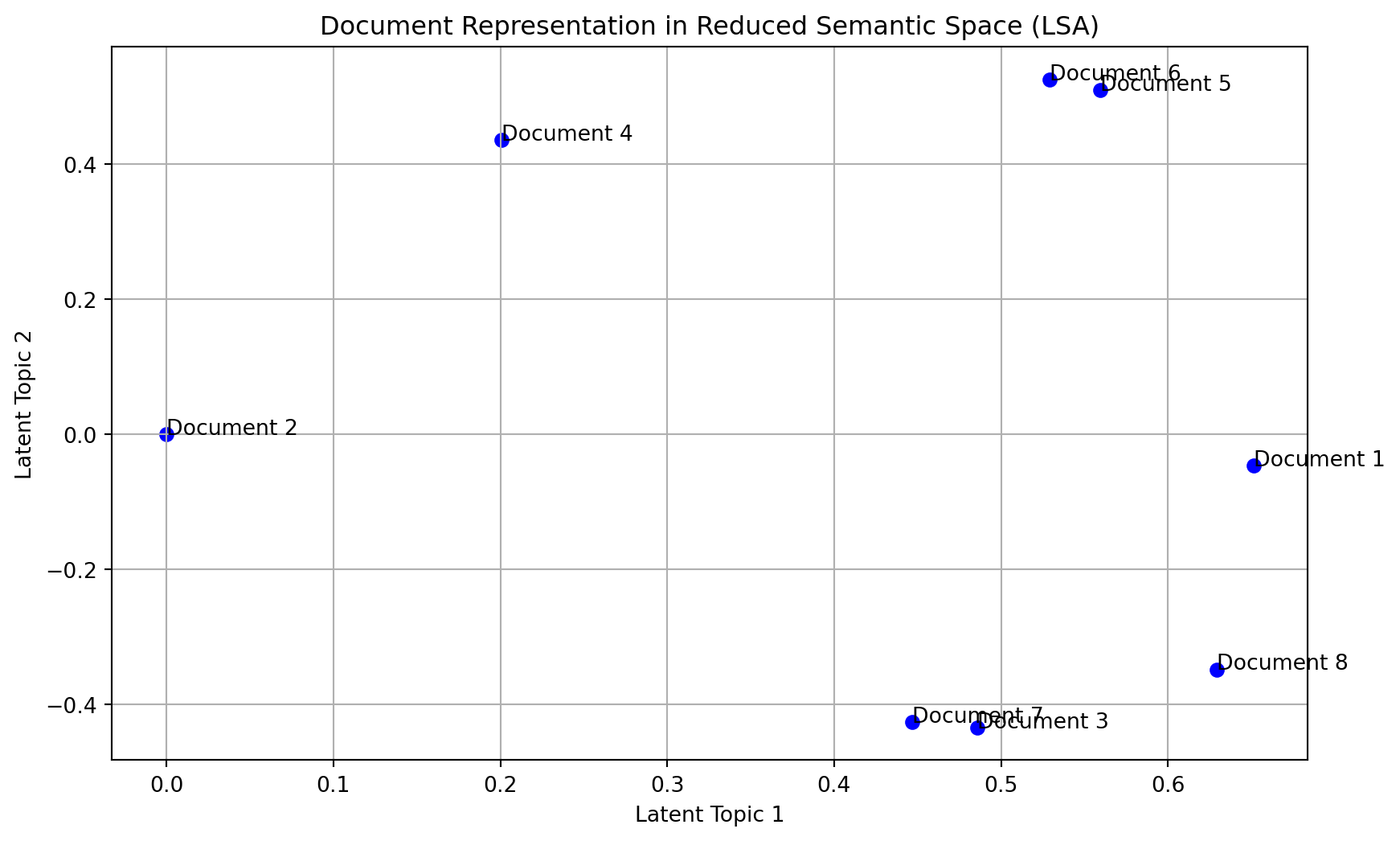
import numpy as npimport matplotlib.pyplot as pltfrom sklearn.feature_extraction.text import TfidfVectorizerfrom sklearn.decomposition import TruncatedSVDimport pandas as pd# Step 1: Define a small collection of documents (related to machine learning)documents = ["Machine learning is a method of data analysis","It automates analytical model building","Machine learning is a branch of artificial intelligence","It is based on the idea that systems can learn from data","Supervised learning requires labeled data","Unsupervised learning does not require labeled data","Machine learning can make decisions without human intervention","Deep learning is a subfield of machine learning"]# Step 2: Create a term-document matrix using TF-IDF (Term Frequency-Inverse Document Frequency)vectorizer = TfidfVectorizer(stop_words='english')X = vectorizer.fit_transform(documents)# Step 3: Apply SVD (TruncatedSVD for dimensionality reduction, simulating LSA)svd = TruncatedSVD(n_components=2) # Extract two latent topicsX_svd = svd.fit_transform(X)# Step 4: Display the results# Terms (words) associated with each component (latent semantic)terms = vectorizer.get_feature_names_out()components = pd.DataFrame(svd.components_, columns=terms)print("Latent Topics (SVD Components):")print(components)# Create an index of the documentsdocument_indices = [f"Document {i+1}"for i inrange(len(documents))]# Create a scatter plot of the documents in the reduced semantic spaceplt.figure(figsize=(10, 6))plt.scatter(X_svd[:, 0], X_svd[:, 1], color='blue')# Annotate each point with the document indexfor i, txt inenumerate(document_indices): plt.annotate(txt, (X_svd[i, 0], X_svd[i, 1]))# Add labels and titleplt.xlabel("Latent Topic 1")plt.ylabel("Latent Topic 2")plt.title("Document Representation in Reduced Semantic Space (LSA)")# Display the plotplt.grid(True)plt.show()# Display documents in the reduced semantic spaceprint("\nDocuments in Reduced Semantic Space:")for i, doc inenumerate(X_svd):print(f"{document_indices[i]}: {doc}")
This example shows how LSA can be applied to uncover latent structures in text data using the SVD.
4.4 Recommender Systems
SVD is also widely used in recommender systems, especially in collaborative filtering methods. In such systems, we work with a user-item rating matrix \(A\), where entries correspond to ratings given by users to items. The goal is to predict missing ratings and make recommendations.
4.4.1 Matrix Factorization in Recommender Systems
Using SVD, the rating matrix \(A\) is decomposed as:
\[
A = U \Sigma V^T
\]
The matrix \(U \Sigma\) represents the latent factors for users, and \(V^T\) represents the latent factors for items. We can use these latent factors to predict missing ratings and make recommendations.
In this example, the SVD is used to approximate the user-item matrix \(A\) and predict the missing entries (represented by 0s in the matrix).
4.5 Conclusion
SVD is a versatile tool with many practical applications in data analysis, machine learning, and natural language processing. Whether you’re compressing images, performing dimensionality reduction, or uncovering latent relationships in text, SVD provides a robust framework for solving complex problems efficiently.